Connectivity with Sentri-Fi
Sentri-Fi provides connectivity for your Rachio controller through your chosen network.
We offer Verizon, AT&T, T-Mobile, or a combination of all three via our Triple Carrier Premier Service.
The Triple Carrier Premier Service network always chooses the most robust network in your area. Gone are the days of trying to figure out which carrier will work best- get the best of all of them!
CHOOSE YOUR NETWORK
Sentri-Fi offers monthly plans or annual plans. Please review the options below and subscribe before continuing to the next steps. Once you select a network, the next page will ask you for a SIM Card Number.
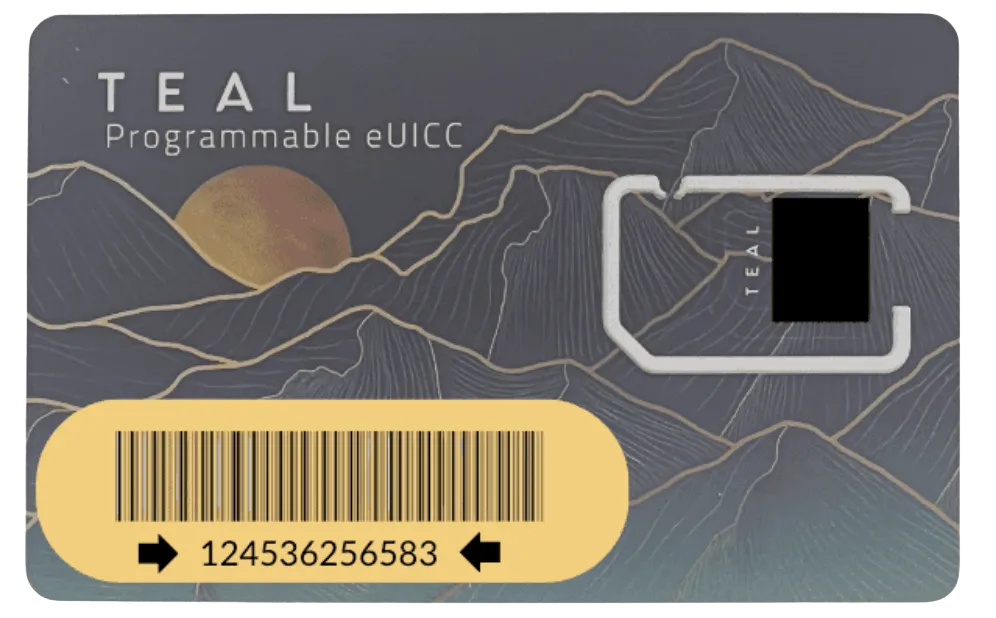
Please fill in the number on your SIM Card (pictured below) to ensure correct billing.
IMPORTANT:
You must choose a network from the subscriptions below to activate your SIM/Cellular Network before completing any other steps.
The connectivity will not work without completing this step.
Monthly Sentri-Fi Verizon Service
Verizon
Connectivity Solution
Pricing is per Gigabyte.
Min 1 Gigabyte/user/month.
Uncapped.
1-time setup fee of $15/sim.

Monthly Sentri-Fi T-Mobile Service
T-Mobile (Sprint)
Connectivity Solution
Pricing is per Gigabyte.
Min 1 Gigabyte/user/month.
Uncapped.
1-time setup fee of $15/sim.

Monthly Sentri-Fi AT&T Service
AT&T
Connectivity Solution
Pricing is per Gigabyte.
Min 1 Gigabyte/user/month.
Uncapped.
1-time setup fee of $15/sim.
Monthly Sentri-Fi Triple Carrier Premier Service
The best of all providers.
Always maintain service on the roaming plan - it always chooses your most robust network for you.
Pricing is per Gigabyte.
Min 1 Gigabyte/user/month.
Uncapped.
1-time setup fee of $15/sim.
NEXT STEPS
Please follow the steps below to set up your Rachio controller and connect to your new network.
1. Plug the router into a power outlet using the power cord provided.
2. Scan the QR code on the router with your phone.
3. Click the JoinNetwork link. Please be patient, as it can take up to 20 minutes for the SIM and router to sync.
4. Enter the router's Web interface (WebUI), type http://192.168.1.1 into the URL field of your Internet browser.
5. When prompted for authentication enter the username admin and enter the password located on the device information label/engraving.
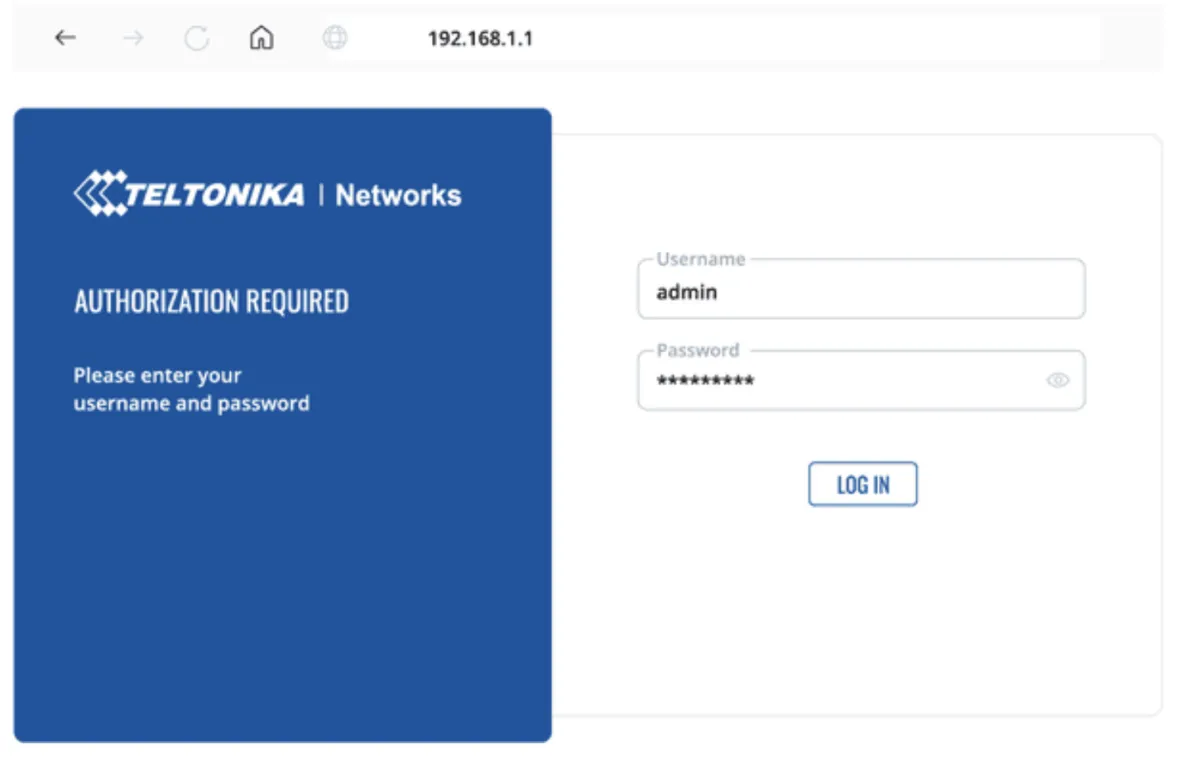
6. After logging in, you must set a new password for security reasons. You will not be able to interact with the router’s WebUI until the default password is changed. The new password must consist of a minimum of 8 characters. Requirements: one uppercase letter, one lowercase letter, and one digit.
7. Next, the Configuration Wizard will start to help you set up some of the router's main operational parameters. Make sure to set Auto APN to off and enter teal in the APN field.
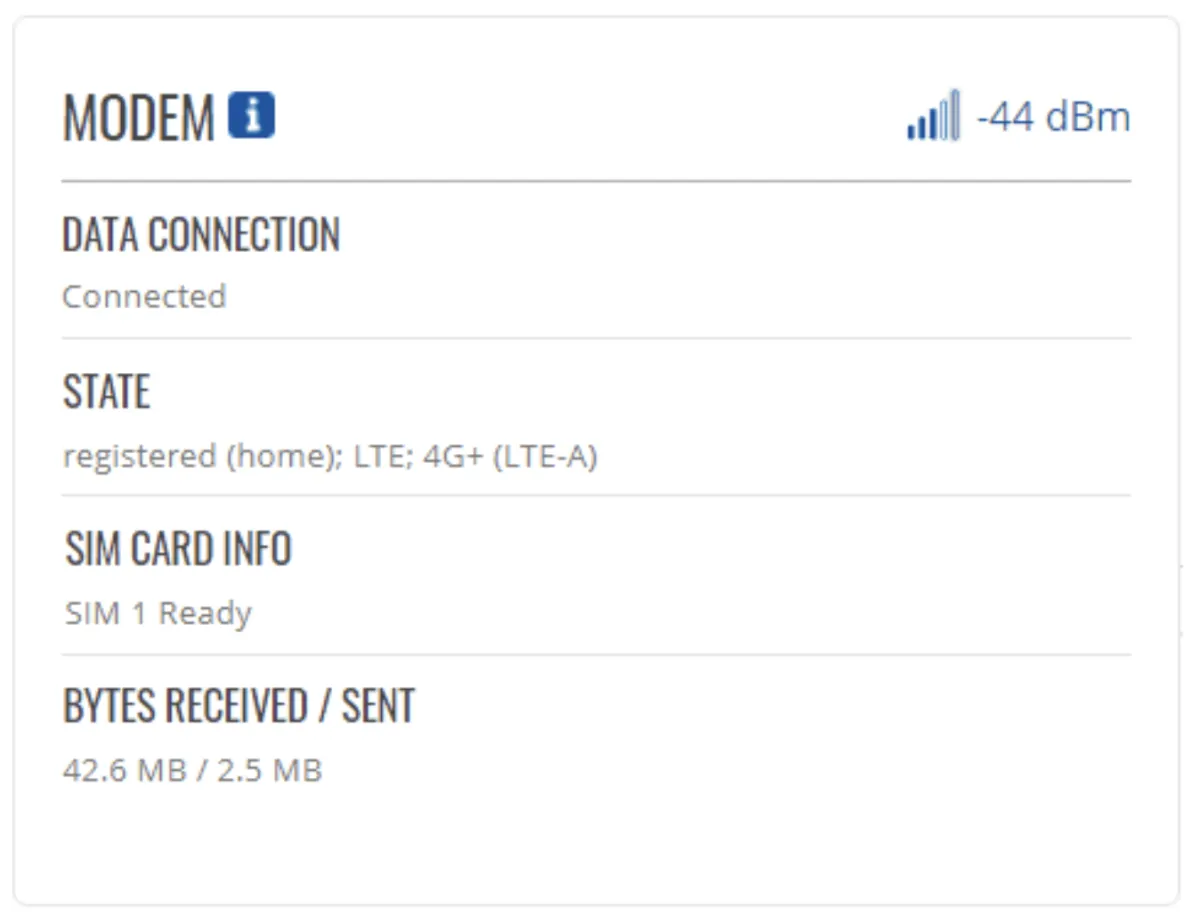
8. Finally, let's verify the Mobile signal strength. Go to the Status — Network page and pay attention to the Signal Strength indication. 5 years of RMS service is included with every router.
9. Disconnect the power cord from the router.
10. Confirm that the connections from the antenna to the router are secure as they may have loosened during shipping and set up.
11. Follow the Rachio controller instructions for mounting the enclosure.
12. Connect the AC power adapter cord (with red and black wires) to the router. You should insert the AC power adapter plug in the same place from which you previously removed the power cord.
13. Mount the Rachio controller according to the Rachio Instructions to the enclosure, ensuring the red and black wires are accessible.
14. Connect the AC power adapter’s red and black wires to the 24VAC + (positive) and - (negative) terminals on your Rachio controller. This will provide power to the router. As the wires are not polarized, the order does not matter.
15. Connect your mobile device to the router’s WiFi network. If you were previously connected, double check to ensure you are still connected.
16. Using your mobile device and the Rachio app, connect your Rachio controller via WiFi to the router’s WiFi network.
17. Once the controller is connected, navigate to your mobile device’s WiFi settings, find your router’s network, and forget the network to prevent your mobile device from automatically connecting to it in the future.
If your phone stays connected, this may increase your data usage, increasing your bill.
ADDITIONAL RESOURCES
TECHNICAL SUPPORT
We are available Monday-Friday, 9 AM-5 PM Central Time.
Email: [email protected]
Protect industrial operations from cyber threats!
Secure Industrial Operations Through Specialized OT/IT Convergence Protection. Sentri-Fi is the premier industrial cybersecurity service provider, protecting manufacturing facilities, utilities, and critical infrastructure from the cyber threats that shut down production, disrupt operations, and compromise essential services.
Why Choose Us
Why Texas Industrial Operations Choose Sentri-Fi
Texas-Native Expertise
Deep understanding of state regulations, industrial processes, and threat vectors.OT/IT Convergence Specialists
Bridging gaps that traditional IT-focused cybersecurity teams can’t see.Industry 4.0 Ready
Tailored protection for SCADA, IIoT, and smart utility networks.24/7 Texas-Based SOC
Rapid incident response from experts familiar with your operational context.
Services
Industrial Cybersecurity
—Built for Texas Infrastructure
Whether you’re running a refinery in Houston or a utility grid in Lubbock, our cybersecurity solutions are engineered to protect what keeps Texas running.

Purpose-Built Security for OT/IT Environments
Protect both your data systems and physical control systems with seamless convergence cybersecurity

Security Experts Who Understand Industrial Complexity
Threat Intelligence Designed for the Texas Industrial Sector

Our Proven Security Framework
See how we implement, and maintain defense-in-depth security with layered protection across all endpoints and networks.
TESTIMONIALS
Hear What Our Clients Have to Say

Sentri‑Fi identified vulnerabilities during our initial assessment that other providers completely missed. Their proactive approach saved us from what could’ve been a major data breach.
– Cybersecurity Lead, Central Texas Energy Company


Sentri‑Fi’s OT/IT convergence expertise prevented a serious ransomware attack on our SCADA network. Our plant continued running without disruption.
– Operations Manager, Dallas Manufacturing Plant

Their Texas-based SOC and fast response time gave us confidence during a recent cyber incident—it was handled swiftly
– IT Director, Gulf Coast Utility
Provider
Frequently Asked Questions
Your Questions, Answered Clearly
How does this platform ensure data privacy and security for its users?
Data security is our top priority. We implement end-to-end encryption, secure data centers, and strict access controls to protect your information. Additionally, we comply with industry standards like GDPR and regularly update our systems to stay ahead of potential threats.
What kind of customer support can I expect after signing up?
We provide 24/7 customer support through various channels, including live chat, email, and phone. Our dedicated team is always ready to help you resolve any issues or answer your queries promptly.
Can I upgrade or downgrade my plan based on my needs?
Absolutely! Our plans are flexible, allowing you to upgrade or downgrade as your business grows or your needs change. You can easily make adjustments through your account settings without any downtime.
Does this platform integrate with other tools and software I already use?
Yes, our platform is designed for seamless integration with popular tools like CRM systems, project management software, and analytics platforms. This ensures smooth workflows without the need for additional development.
Is there a free trial available before committing to a subscription?
We offer a comprehensive free trial that gives you full access to our platform’s core features. This allows you to explore its functionality and determine if it’s the right fit for your needs before making a decision.
How can this platform help my business grow and save costs?
By automating repetitive tasks, optimizing workflows, and providing data-driven insights, our platform helps you increase efficiency and reduce operational costs. This allows you to focus on strategic goals and business expansion.
What kind of training or resources are available for new users?
We provide detailed onboarding sessions, video tutorials, and an extensive knowledge base to help new users get started. Additionally, our team conducts regular webinars to ensure you make the most out of our platform's features.
What is OT/IT convergence and why does it matter?
It’s the integration of operational tech (like SCADA) with IT systems. Without proper security, attackers can cross from IT into process systems—Sentri‑Fi closes these gaps.
How long does an assessment take?
Typically 1–3 days depending on complexity—covering architecture, endpoint inventory, firewall configuration, and threat detection gaps.
Can you work with my existing firewall or tools?
Yes. We support SonicWall, Cisco, Palo Alto, and other major platforms and integrate into your current stack.
How soon can you respond to an incident?
Under "Essential," we respond within 8 business hours; “Advanced” within 2 hours; “Premium” within 1 hour—24/7.
Does Sentri‑Fi comply with NERC CIP, NIST, or ISA/IEC 62443?
Yes. We align with those frameworks and help you maintain audits and compliance documentation.
Is your SOC staffed locally?
Yes—while we support clients across the U.S., all Texas clients have access to SOC agents based in Texas familiar with regional threats and regulations.
How confident are you that your current security measures would detect and stop a cyberattack targeting your production systems?
If the answer is anything less than "very confident," it might be worth a brief conversation.
Quick Links
Contact Us
Legal
© Sentri-Fi 2026 All Rights Reserved.